
Smart Illumination is one of the most useful developments in modern security cameras, but it can also be confusing if you do not know what the camera is doing.
One camera may switch its white light on when somebody approaches, while another at the same property stays in colour without using its own light. This depends on the available light at each camera. Streetlights, laundry, alfresco or porch lighting—even garden lights—can make a difference, as these cameras can produce colour images with very little ambient light.
Smart Illumination automatically chooses between ambient light, infrared and visible white-light illumination to provide the most useful image while reducing unnecessary light pollution.
Quick answer
Smart Illumination allows a dual-light security camera to use infrared for discreet black-and-white monitoring and activate its visible white LED when colour footage is needed.
On the Dahua systems we install, this is normally configured so the white light activates when a person is detected in low-light conditions. If there is already enough ambient light for a colour image, the camera may remain in colour without turning its own LED on.
Why was Smart Illumination introduced?
When full-colour night cameras first became popular, many models relied on a built-in white LED whenever the surrounding area was too dark to produce a colour image.
The colour footage could be excellent, but the visible light was not suitable for every location. We had customers who did not want a camera light shining all night near bedroom windows, patios, neighbouring properties or other areas where constant illumination was unnecessary.
Smart Illumination was the answer. By combining infrared and white-light LEDs in the same camera, it provides discreet monitoring when the area is empty and colour footage when it matters most.
This technology is commonly found in modern Dahua dual-light cameras, including many TiOC models used in our Dahua CCTV systems.
The main benefit
Smart Illumination gives you the colour detail of a white-light camera when somebody enters the area, without leaving a visible camera light running throughout the night.
How does Smart Illumination work?
The camera constantly measures the available light and changes its night-time behaviour according to the conditions.
1. Enough ambient light: The camera remains in colour and does not need to activate its own white LED.
2. The area becomes too dark for colour: The camera changes to infrared, producing a clear black-and-white image without a visible light shining from the camera.
3. A person is detected: If the camera is in infrared mode, its white LED activates and the image changes to colour.
4. The person leaves: After the configured delay, the white LED turns off and the camera returns to infrared monitoring.
Smart Illumination at a glance
Ambient light available: Colour image, camera LED off.
Dark with no detection: Infrared black-and-white image.
Dark with a person detected: White LED on and image changes to colour.
Person leaves: LED switches off and infrared resumes.
Why doesn’t the camera light always turn on?
This is the part that causes the most confusion.
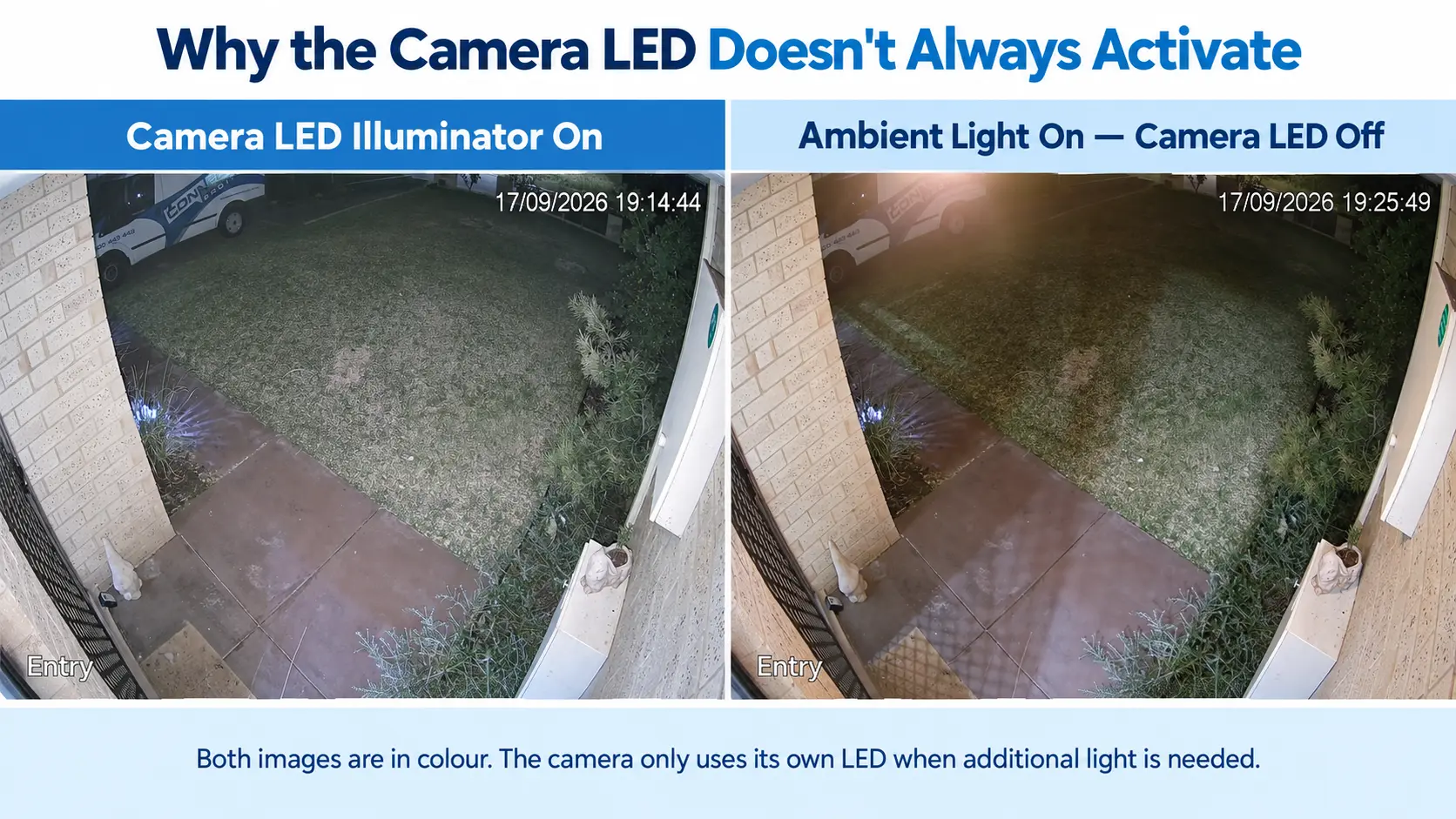
A camera does not judge darkness in the same way as the human eye. An area that appears fairly dark to us may still contain enough light for a sensitive camera sensor to produce a usable colour image.
For example, turning on a laundry, porch or alfresco light may provide enough ambient light for the camera to stay in colour. If somebody then walks into view, the camera may detect them correctly but leave its own LED off because additional white light is not required.
Later that night, after the house light has been turned off, the same camera may revert to infrared. When somebody enters the area again, its LED will activate so the camera can capture them in colour.
The result can appear inconsistent, but the camera is actually adapting to the light available at that moment.
Why can two cameras at the same home behave differently?
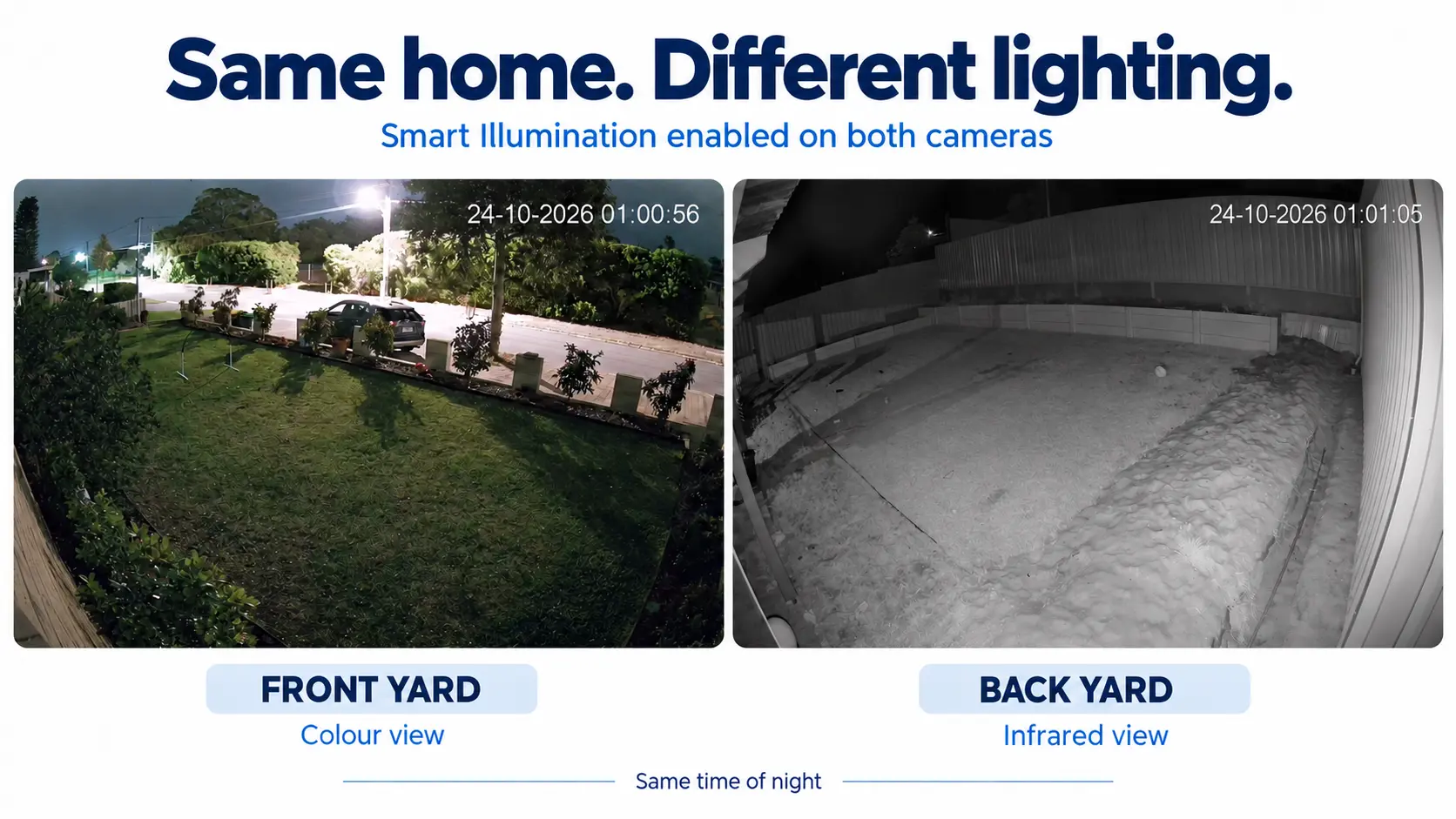
Each camera measures the light at its own location. Two cameras connected to the same recorder can therefore behave differently at exactly the same time.
A driveway camera may receive enough light from streetlights, garage lights or nearby homes to remain in colour without activating its LED. Meanwhile, a camera down the side of the house may be in almost complete darkness, so it uses infrared until a person is detected.
- The driveway camera can stay in colour with its LED off.
- The back camera can remain in black-and-white infrared mode.
- The back camera’s white LED can activate when somebody enters.
- Both cameras are operating correctly.
Camera direction, surrounding walls, weather, moonlight and nearby lighting can all affect the available light.
Camera sensors and minimum illumination levels
Every camera sensor needs a minimum amount of light to produce a usable colour image. Manufacturers usually publish this as a minimum illumination figure measured in lux.
The required light level varies between camera models. Sensor size, lens aperture, resolution and image-processing technology all affect how well a camera can operate in low light. This is why two different camera models positioned beside each other may not change modes at precisely the same time.
Specifications are useful when comparing cameras, but they do not describe every real installation. Reflections, uneven lighting, moving subjects and the direction of the available light can all affect the final image.
Can the illuminator settings be changed?
Compatible Dahua cameras provide different illuminator modes. The available controls vary with the camera, recorder, firmware and app version.
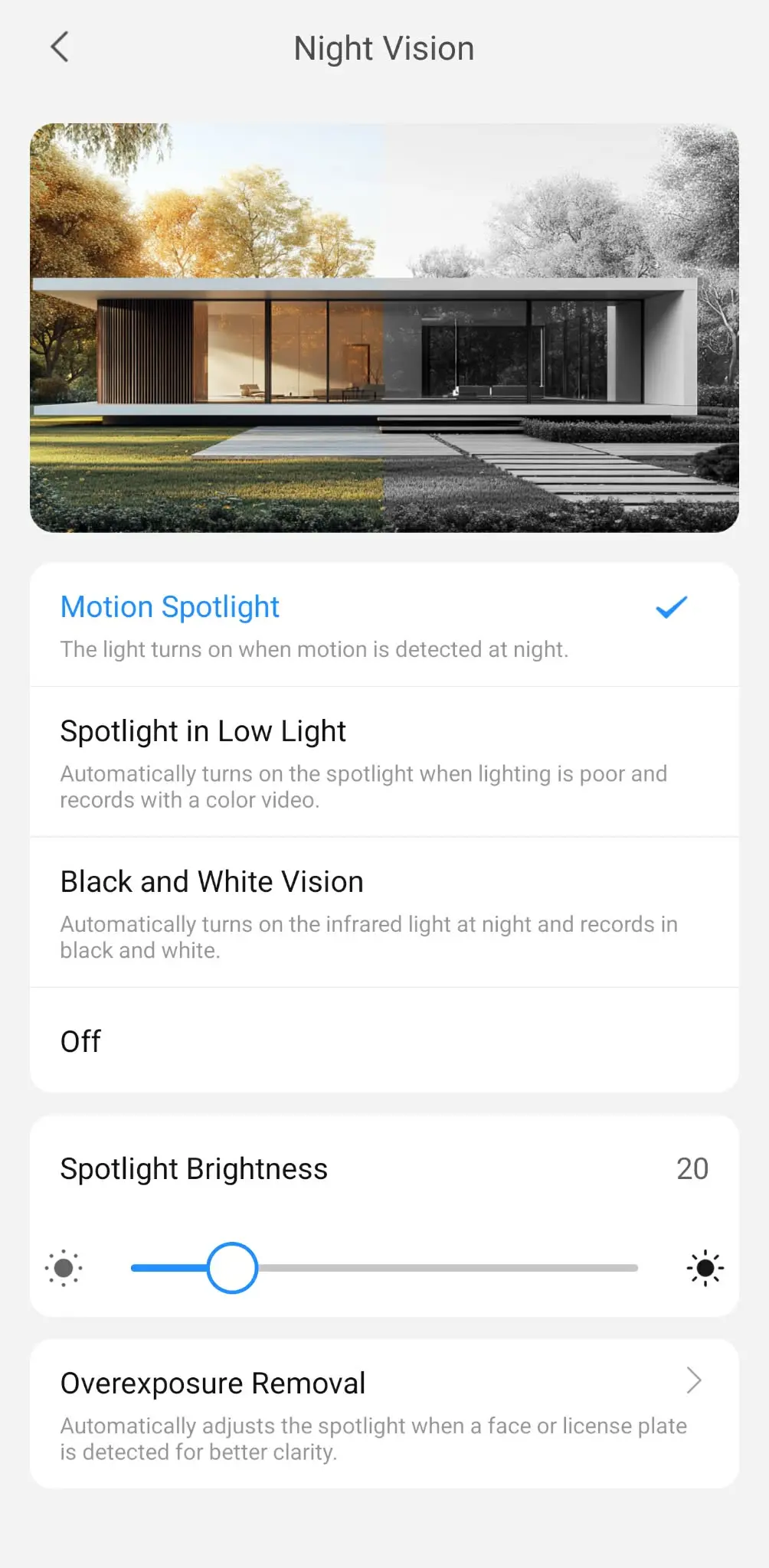
Night Vision options in DMSS
Motion Spotlight: The camera normally monitors discreetly at night and turns on the spotlight when the configured motion event is detected. On compatible systems, this can be used with human detection to provide colour when a person enters the area.
Spotlight in Low Light: The spotlight turns on automatically whenever the available light is too low, allowing the camera to continue recording in colour.
Black and White Vision: The camera automatically uses infrared at night and records in black and white without a visible spotlight.
Off: Turns the camera’s night illuminators off. Image quality then depends entirely on the available ambient light.
Spotlight Brightness: Adjusts the output level of the built-in spotlight.
Overexposure Removal: Automatically adjusts the spotlight when a face or licence plate is detected to improve clarity and reduce excessive glare.
The exact menu names and available controls can vary between camera models, firmware and DMSS versions.
Is Smart Illumination the same as colour at night or WizColor?
No. These terms are related, but they describe different parts of a camera’s night-time performance.
Colour at night generally describes a camera’s ability to produce colour footage in low-light conditions, often with assistance from a built-in white LED when required.
Smart Illumination describes how a dual-light camera automatically switches between infrared and visible white light according to the available light and configured detection events.
WizColor refers to Dahua’s highly light-sensitive colour-imaging technology. It can maintain a colour image in extremely low ambient light, but it still has a minimum illumination requirement. No camera sensor can produce a useful colour image in complete darkness without some source of visible light.
We will cover this distinction in more detail in a separate article comparing colour-at-night cameras with WizColor technology.
Is Smart Illumination worth having?
For most homes, Smart Illumination provides an excellent balance between discreet monitoring and useful colour evidence.
It gives homeowners colour footage when it matters most, without unnecessary light pollution.
Learn more about our professional CCTV installation service in Perth, or request a free quote.
